Gradle Technologies is now Develocity — read the announcement

Android

Accelerate the large Gradle builds behind every Android app — surfacing and eliminating bottlenecks with Develocity's caching, Build Scan insights, and Predictive Test Selection.

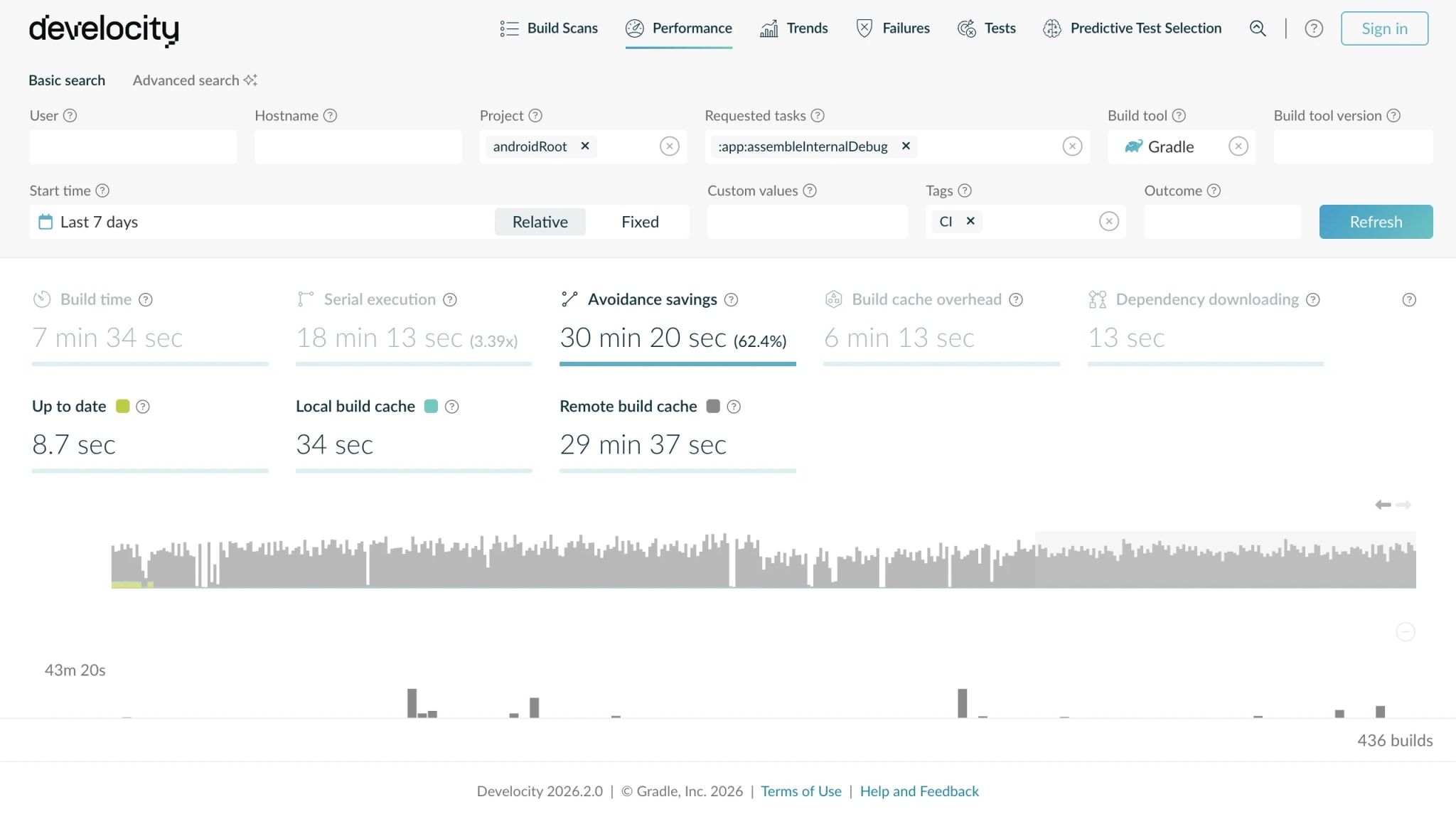
Develocity Performance view of an Android build showing cache-avoidance savings and a per-task timeline.

Feature overview

Android

An Android app is one of the largest and most complex Gradle builds an organization runs — hundreds of modules, the Android Gradle Plugin (AGP), and a long chain of code generation and resource processing every time you build the app. Develocity captures that same build as a Build Scan. The Universal Cache accelerates the three phases an Android build repeats — configuration with Setup Cache, dependency resolution with Artifact Cache, and task and transform outputs with Build Cache. Predictive Test Selection then runs only the unit tests a change can affect, not the whole suite across hundreds of modules. And because every build is a Build Scan, you can see why any build hit or missed the cache — down to the input that changed — and track cache hit rate, build time, and failure rate across every Android module and team.

Do only the work a change requires — recompile what changed, run the tests it can affect, skip the rest

  • A one-line change re-runs only the tasks it touched — Build Cache restores the rest, so the build skips compilation and resource work it already did.
  • Reuse spans every agent and CI vendor — compile a module once, and every other Android build that needs the same output restores it instead of repeating it.
  • Adopt it with no build-script changes — the Android Gradle Plugin is cacheable out of the box, so most Android builds benefit from Build Cache as-is.
  • The same avoidance extends to tests — Predictive Test Selection predicts which unit tests a change can affect from build history and runs only those, skipping the rest.
Develocity avoidance view of an Android build after a single-module change — tasks restored from Build Cache and unit tests skipped by Predictive Test Selection.

Reuse the configuration work a large Android build repeats on every agent

  • Setup Cache shares the compiled DSL scripts, dependency accessors, and API jars across ephemeral CI agents, so hundreds of modules and included builds don't reconfigure cold each run.
  • Configuration time typically drops by half — on a cold CI agent, it can otherwise dominate the wall-clock before the first task even runs.
  • Adoption needs no build-script changes, and it accelerates every Gradle project — even Android modules not yet set up for Build Cache.
  • See what configuration caching actually saves — Develocity reports Gradle's realized configuration-cache savings build by build, so each Android team finds where the phase still recomputes.
An Android build's configuration phase accelerated by Setup Cache, configuration time roughly halved versus a cold CI agent.

Resolve the Android dependency graph from your network, not the internet

  • An Android build resolves a large dependency graph from Maven repositories on every CI run — Artifact Cache serves it from a LAN-local Develocity Edge node instead.
  • In a controlled benchmark on the AndroidX paging-playground project, dependency download fell from 44m20s to 2m49s (15.7×) and volume from 1.9 GiB to 23.1 MiB.
  • Ephemeral CI agents stop re-downloading the same packages each run — a large Android project can move gigabytes of dependency traffic per build, kept on the LAN.
  • The Artifact Cache CLI runs as a CI pre-step — the build tool untouched, no build.gradle edits, adopted once across every Android project.
Before/after of an Android build's dependency downloads — 739 MiB pulled over the network on a cold build versus 0 bytes when served from Artifact Cache.

See exactly what an Android build did — where its time went, and why a cache hit broke

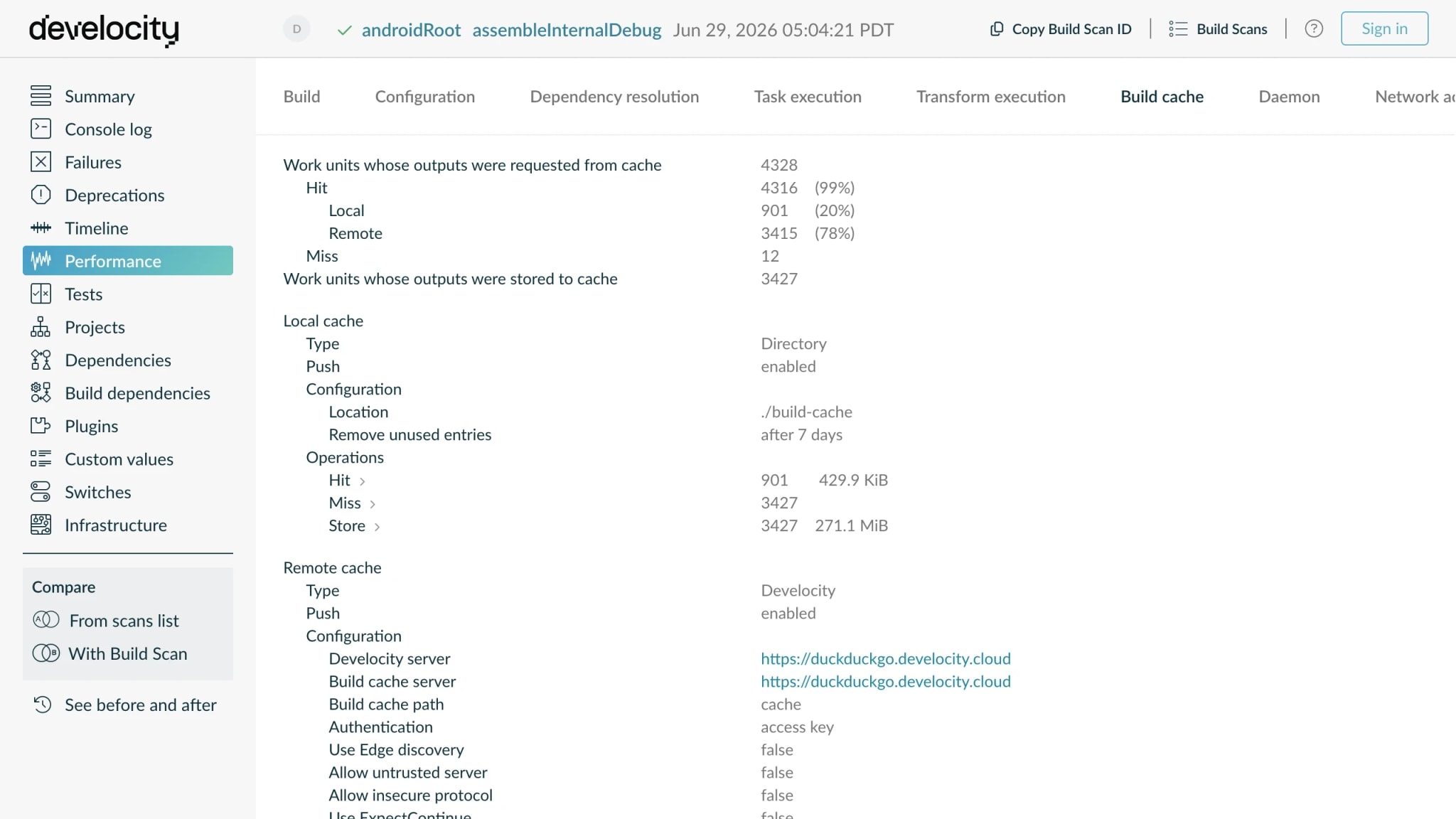
  • Every Android build is a Build Scan — task timings, failures, deprecations, and cache outcomes captured per run, so you diagnose from the Build Scan, not the console log.
  • When a cache hit turns into a miss, it's usually a volatile input — BuildConfig timestamps, Crashlytics debug IDs, non-reproducible resources — and Develocity names the one responsible.
  • Identical source can still miss the cache across machines when JDK vendor, OS, or code generators differ — Develocity pinpoints which input diverged, so normalizing it restores reuse.
  • The same Build Scan surfaces every artifact transform AGP runs with its outcome, so dependency-processing time that's opaque in console output becomes attributable.
A Build Scan comparison of two Android builds, highlighting the single changed input that caused a cache miss.
Analytics

Track every Android team's build health, and catch the quiet regressions

  • Develocity Analytics trends cache hit rate, build time, and failure rate across every Android module and team, turning a quiet regression into an attributable, fixable event.
  • See which Android modules carry the most unrealized cache savings, and roll out to the slowest assemble tasks first instead of guessing where the payoff is.
  • Ask it in plain language through Develocity MCP Serverswhich modules slow my build the most and are worth splitting up first? — answered from your own build data.
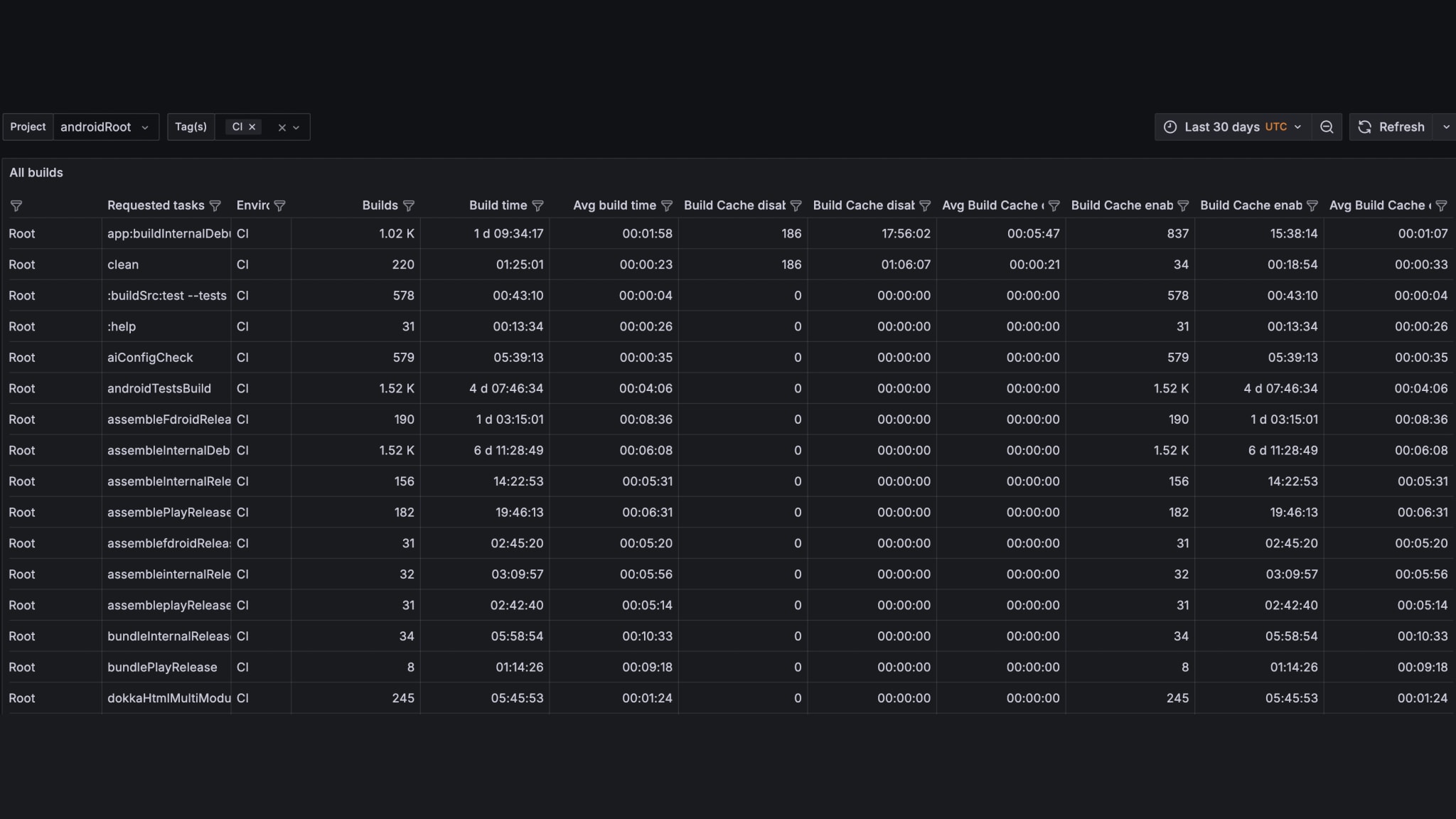
Develocity Analytics dashboard filtered to Android modules, trending cache hit rate, build time, and failure rate per module and team.
Analytics

Trend test health across your full Android suite — unit and instrumented

  • Every test an Android build runs lands in its Build Scan with its pass/fail outcome and duration captured per run.
  • Develocity Analytics trends those results across every Android module and team, so the slowest and most-failing suites surface instead of hiding in CI logs.
  • Instrumented androidTest results from device and emulator suites report the same pass/fail and duration as unit tests, so an Android team reads the whole suite's outcomes in one place.
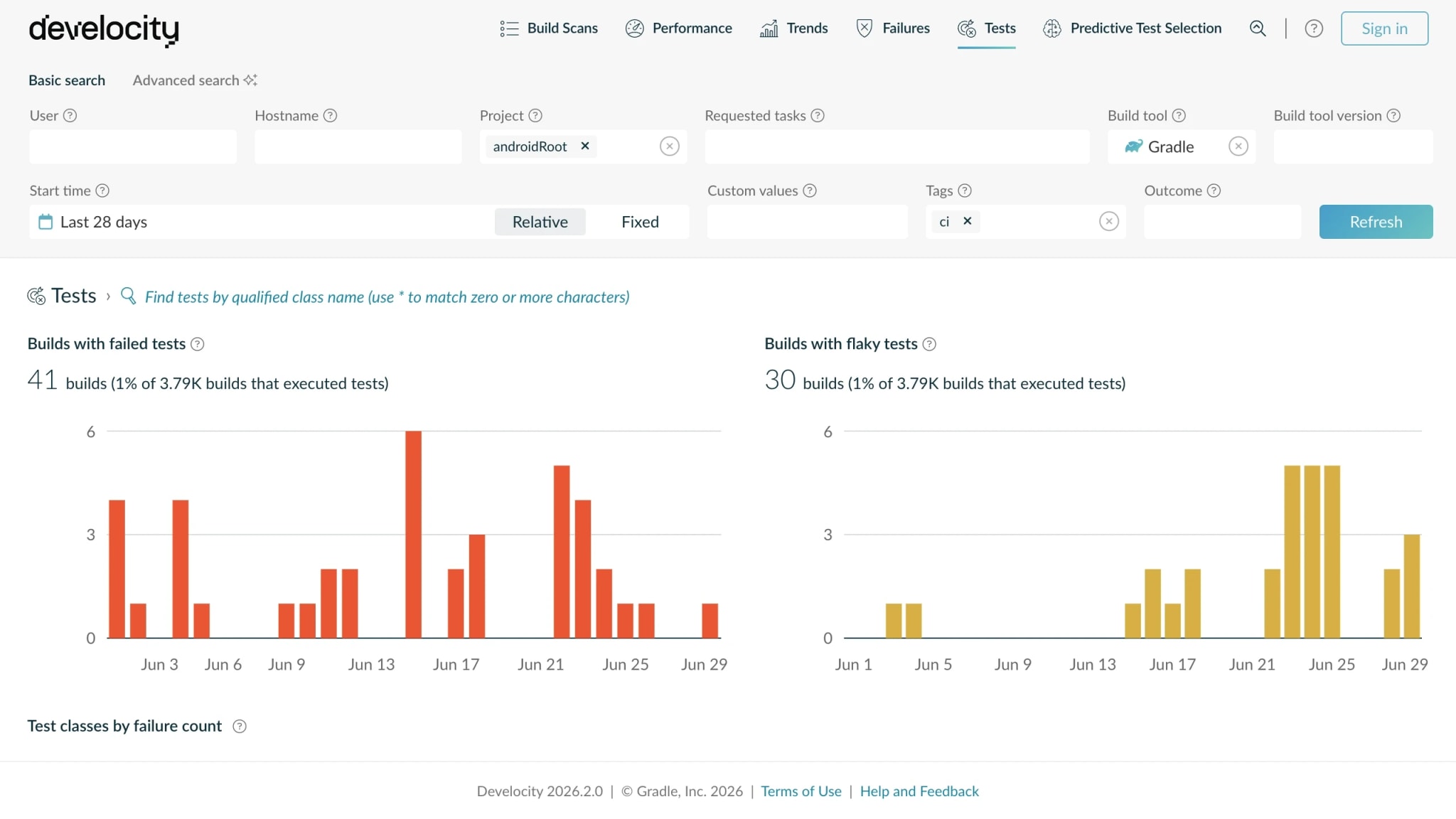
Develocity Test Analytics view for an Android project showing instrumented test results alongside unit tests, with pass/fail rate and duration.

Resources

How DuckDuckGo Cut Their Android Build Times by Up to 57%
Blog
Develocity saves Netflix 280,000+ hours per year with faster builds and tests
Case study
Android Cache Fix Gradle Plugin
Documentation
Getting Started With Develocity for Gradle Users
Documentation

What's next

Get started today with a 30-day free trial of the entire Develocity product suite.

Start Free Trial

© 2026 Gradle, Inc. Gradle®, Develocity®, Build Scan®, and the Gradlephant logo are registered trademarks of Gradle, Inc.

Get an AI summary of Develocity: